Mobile Regions
A downloadable Mobile Regions
Hello,
Thanks for trying my Mobile Regions system for RPG Maker MZ.
This plugin was created with AI assistance.
RPG Maker's built–in Region IDs are fixed to tiles on the map. This plugin
lets you define "mobile regions" that follow moving events around.
Other plugins (or your own code) can then rely on $gameMap.regionId(x, y)
and get either:
- the original map region, or
- a region provided by a nearby event, if one is defined.
This is especially useful for mechanics like:
- movable hitch posts / anchors
- moving hazards or aura zones
- puzzle pieces that carry their own region logic
---------------------------------------------------------------------------
HOW IT WORKS
---------------------------------------------------------------------------
You mark events with comment tags on the active page:
<MobileRegion: R>
<MobileRegion: R, dx, dy>
Where:
R : Region ID (1–255)
dx : X offset from the event (tiles, optional, default 0)
dy : Y offset from the event (tiles, optional, default 0)
Each tag describes ONE tile that will report Region ID R while the event is
on the map. You can place multiple tags on a single event to define a
shape around it.
Example (movable hitch post)
---------------------------------------------------------------------------
Imagine a hitch post that should have:
- Region 31 on the tile in front of it (for hitching)
- Region 32 on the two diagonal "unhitch" tiles
If the post faces down, you might use:
<MobileRegion: 31, 0, -1> # directly above the post
<MobileRegion: 32, -1, -1> # up-left corner
<MobileRegion: 32, 1, -1> # up-right corner
As the event moves, these three tiles move with it.
---------------------------------------------------------------------------
PRIORITY
---------------------------------------------------------------------------
By default, a MobileRegion WILL override the map's base Region ID on that
tile.
If you need the original Region ID anyway, you can use:
$gameMap.baseRegionId(x, y)
to bypass the mobile overlay.
TERMS
This plugin is free for use in commercial and non-commercial projects so long as the content isn’t illegal. Please do not make minor adjustments and release the plugin in your own name. Credit (and game this system was used in) are always appreciated! Please credit Justin Mills and link back to my itch.io page.
INSTRUCTIONS
Place the plugin in your js folder and set the parameters.
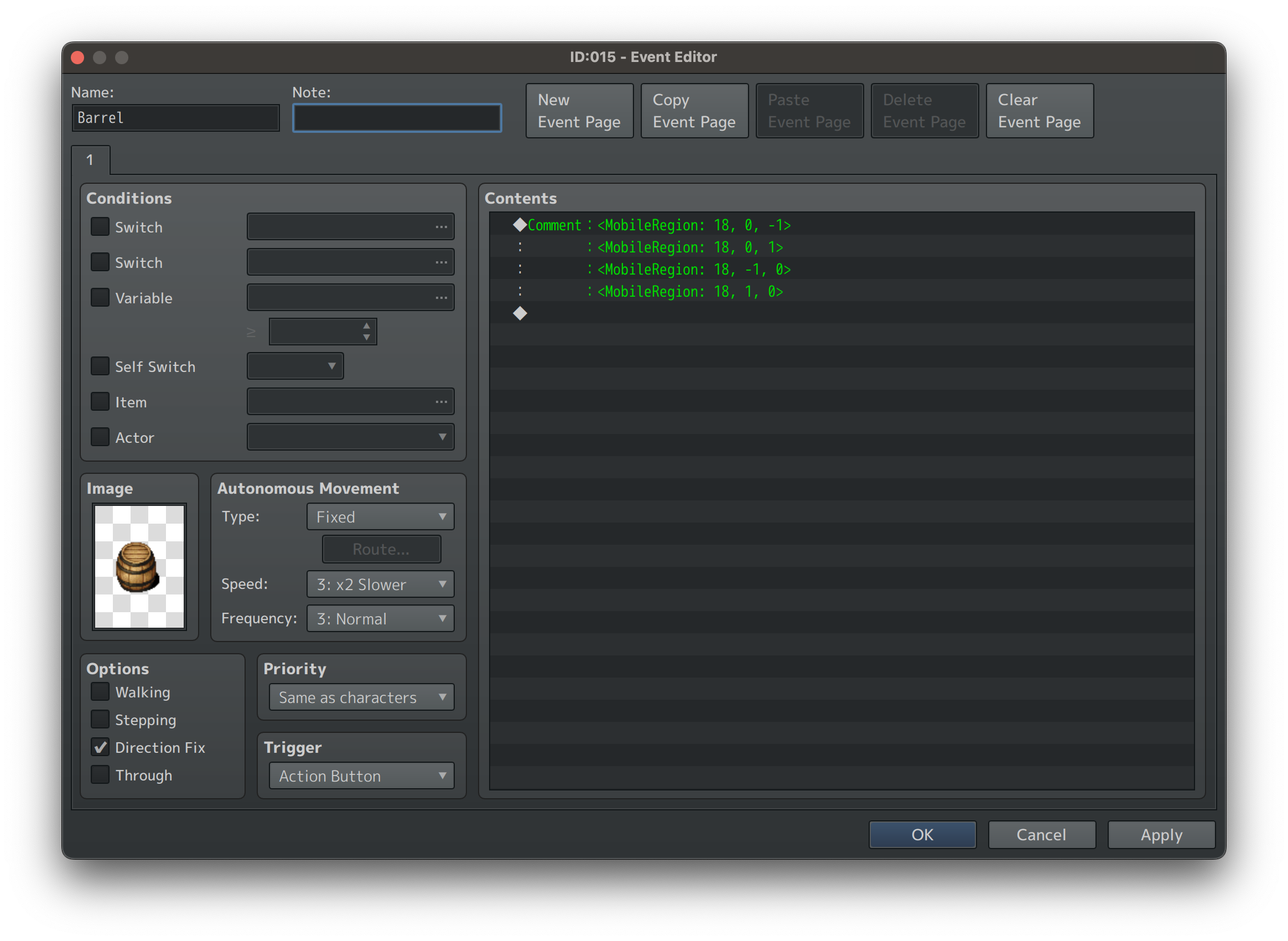
Add a comment to an event to designate the region you want to follow that event and where it is attached.
For example:
<MobileRegion: 18, 0, -1>
<MobileRegion: 18, 0, 1>
<MobileRegion: 18, -1, 0>
<MobileRegion: 18, 1, 0>
This will put region 18 immediately above, below, to the left, and to the right of the event.
Parameters can decide what will happen in the case of overlapping regions if the event moves onto an area already painted with regions (both won’t be true. Sorry).
NOTE:
I will do my best to support the plugin to address bugs, but compatibility issues with other plugins (pixel movement, MZ3D, VisuStella, etc.) will be on a case-by-case basis and predicated largely on whether I have a copy of that system already to reference against.
Download
Click download now to get access to the following files:
Leave a comment
Log in with itch.io to leave a comment.