Pushable Objects
A downloadable JM Pushable System
This plugin was created with AI assistance, but it is very nuanced and dynamic. Hopefully, though, it’s user friendly and plug-and-play.
Once you’ve loaded the plugin into your project, you can set parameters for how you want the system to work in general, but almost all of these can be overridden with plugin commands for individual events.
TERMS
This plugin is free for use in commercial and non-commercial projects so long as the content isn’t illegal. Please do not make minor adjustments and release the plugin in your own name. Credit (and game this system was used in) are always appreciated! Please credit Justin Mills and link back to my itch.io page.
INSTRUCTIONS
Make an event pushable — Add "<Pushable>" as a Comment on the event page you want pushable behavior on.
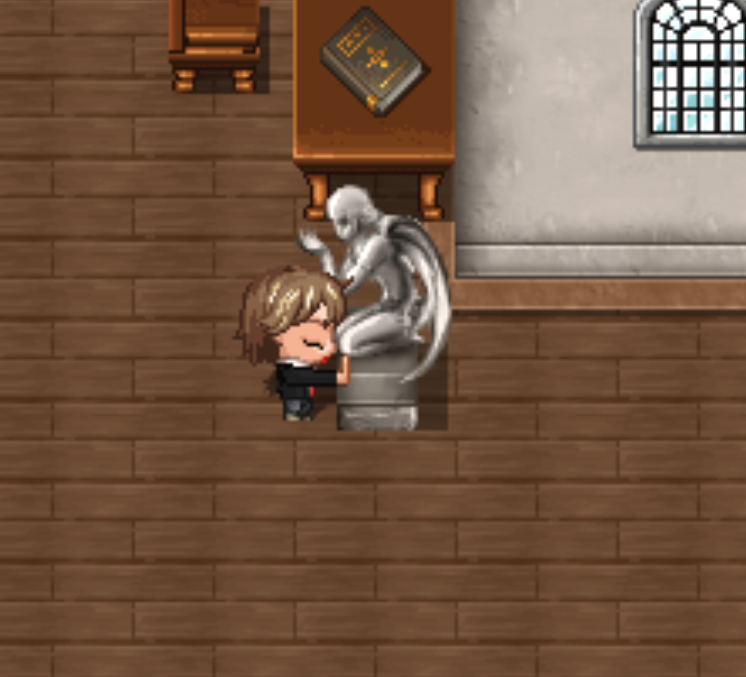
How the player uses it in-game — Stand adjacent, face the event, then hold OK/Accept to latch; keep holding to move together, release to stop.
Wall start override — Add "<WallOverride>" (or "<WallOverrride>") on the pushable page to allow starting inside an impassable wall, moving out, and recoiling back into that wall origin.
Struggle + snug behavior — Latch includes a short “struggle” delay and a half-step snug/unsnug animation for a tighter feel (tuned by parameters like Struggle Frames).
Overlays (balloon/icon) — Enable global overlays in plugin parameters, or per-event override via Set Pushable Config to show a balloon/icon on the player and/or the event during latch/sequence.
Sound effects — Set global latch/move SE in plugin parameters, or per-event override via Set Pushable Config.
Hooks (CE / script / self-switch) — Use global parameters or Set Pushable Config per-event to run actions on Latch, on the first successful move while latched (Sequence), and on Release.
Weight + immovable rules — Weight sets shared push speed (Light/Fast, Medium, Heavy/Slow); you can also make an event immovable unless an item/switch requirement is met (global or per-event).
Recoil (return to origin) — Use Set Pushable Recoil per-event to make it return to its origin (Straight or Backtrack), with speed/delay, optional SE, hooks on start/return, optional overlays, sprite behavior, and “can be caught” to cancel recoil by re-latching.
Guardian tiles (regions/terrain tags) — Set global lists in parameters or per-event via Set Pushable Guardians; entering those tiles can trigger CE/script/self-switch, and can optionally be made impassable for that pushable (push + recoil).
Player states (party leader) — Apply/remove states on latch/release, and apply duration/persist states during latch, recoil, and while on guardian tiles (global params or Set Pushable States per-event).
Sprite swaps (player/event) — Configure latch/recoil sprite changes globally or per-event via Set Pushable Sprites (choose whether they revert or persist).
Persistent sprites cleanup — Use Clear Pushable Persistent Sprite to clear a stored persistent sprite override for a specific event (map/event targeting supported).
Position persistence — Enable globally/per-event so pushables remember their last unlatch/recoil-end position across map transfers; clear with Clear Pushable Position Persist.
Position trigger — Use Set Pushable Position Trigger to fire a CE/script/self-switch when that event reaches a specific X,Y (optionally once).
Latch switches (global) — List switches in Latch Switches parameter: they turn ON while latched to any pushable, and OFF on release.
Latch drains (global + overrides) — Drain variable/HP/MP/TP/EXP/Gold while latched; variable drain can Force Release, Stall movement, or Regen-until-threshold.
Compatibility toggles — Optional settings for VisuStella Move Core, MZ3D, and Pixel Movement latch-detection mode (48x48 / 32x32).
NOTE:
This plugin is compatible with Phoenix Kage Desu’s AnimaX, which I highly recommend to provide additional animation to show the character sprite latched onto an object. Balloon/Icon Overlays work out of the box, as does the snug system.
I will do my best to support the plugin to address bugs, but compatibility issues with other plugins (pixel movement, MZ3D, VisuStella, etc.) will be on a case-by-case basis and predicated largely on whether I have a copy of that system already to reference against.
This plugin is required to use the JM_DragChain plugin. Make sure it is above JM_DragChain on your plugin manager list.
Download
Click download now to get access to the following files:
Leave a comment
Log in with itch.io to leave a comment.